
Creating content
How to add photos and videos to a post
Upload files from your computer (up to 1 GB each) or paste a public link, and build an Instagram or LinkedIn carousel.
Add photos and videos to a post straight from your computer. Kredia uploads the file and hosts it for publishing, so you don't need to find a public link yourself.
Before you start
- You're an Editor, Admin or Owner. Viewers can't upload media.
- Your file is supported: JPEG, PNG or WebP for photos, MP4, MOV, M4V or WebM for video, up to 1 GB per file.
- You know what the platform accepts. For example, TikTok and YouTube need a video, and Pinterest needs an image. See What you can publish on each platform.
Add a photo or video
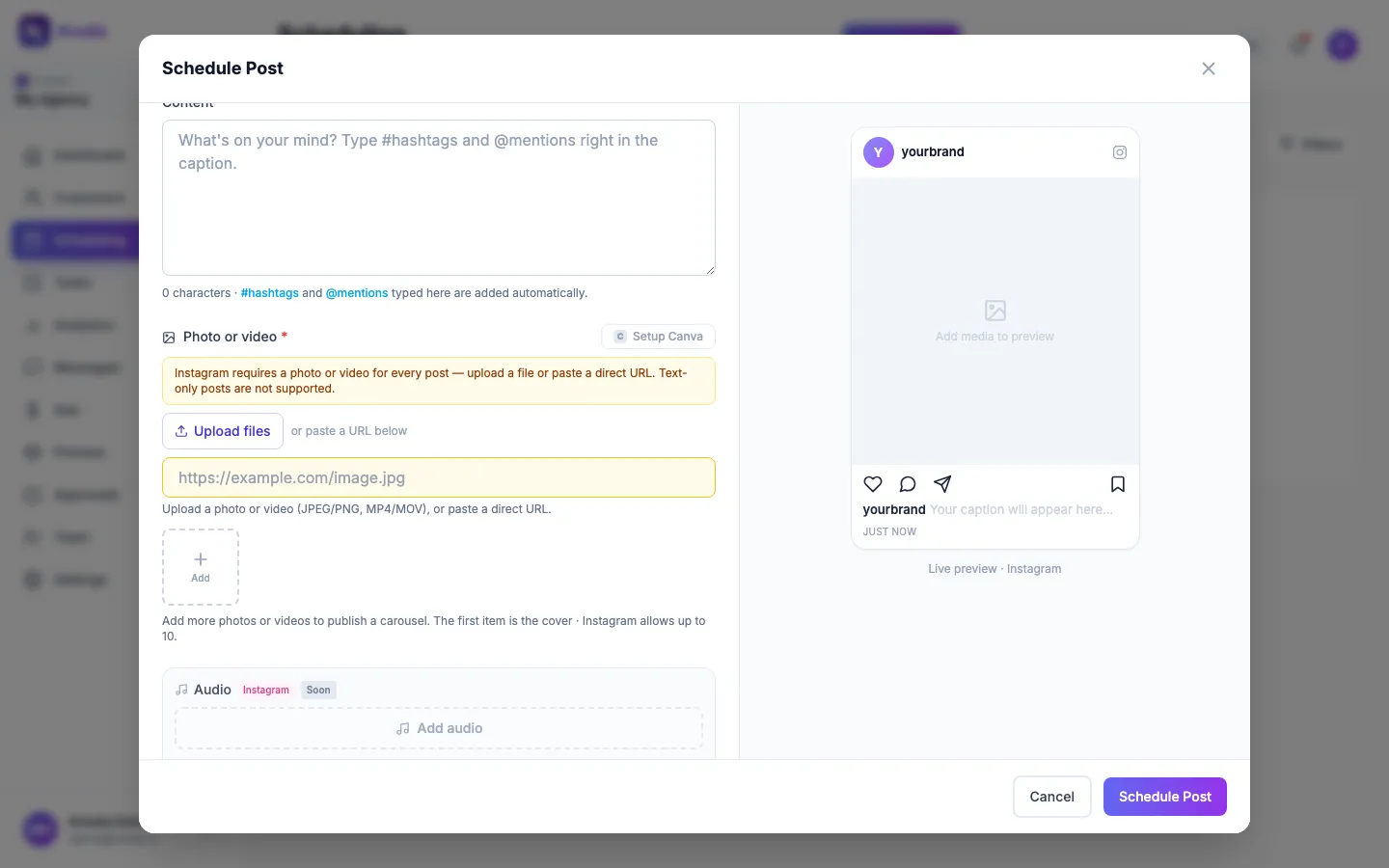
- Open the composer: Scheduling → New Post.
- Pick the platforms and the client first, so Kredia knows which media rules apply.
- Under Photo or video, click Upload files and choose one or more files.
- Wait for the upload to finish. The button shows the progress as a percentage.
- Check the live preview on the right.
Use a link instead
Below Upload files you can paste a link instead. It must be a direct link to the file itself (ending in something like .jpg or .mp4) that anyone can open without signing in. Links to a Google Drive or Dropbox page, or to a post on another site, don't work.
Build a carousel
For Instagram (up to 10 items) and LinkedIn (up to 20 images), click the Add tile below the media field to add more photos or videos. The first item is the cover. On LinkedIn you can't mix images and video in one post.
Use a Canva design
If your agency connected Canva in Settings, click Pick from Canva to add a design. It's added as a PNG image. If Canva isn't connected, the button reads Setup Canva and takes you to Settings.
What can go wrong
- "Files must be under 1 GB." Compress the video or shorten it, then upload again.
- "Please choose a photo (JPEG, PNG, WebP) or video (MP4, MOV, M4V, WebM)." Export the file in one of those formats.
- The post fails with "not publicly accessible". The pasted link isn't a public, direct file link. Upload the file with Upload files instead.
- Only some files were added. Instagram allows up to 10 items, so Kredia keeps the first 10.
- Mixed platforms share one file. If you post to an image platform and a video-only platform (TikTok or YouTube) together, they share the same media. Make sure it works for all of them, or create separate posts.
- Several images on Facebook or Threads. Today only the first image is published on Facebook and Threads.
See also
Was this article helpful?